Daily Orbs Archive: How to Play Previous Days
The Daily Orbs archive is inside the original game's menu. Open Daily Orbs, choose the ☰ menu, find Archive and select an available date. You can also use Previous day to move back from the set currently on screen. The archive offers older daily sets; it is not a separate generator of unlimited new puzzles.
Open Daily Orbs and play. For scoring rather than date navigation, read the full rules guide.
Open the Daily Orbs archive
- Open the game on our play page and press Play Daily Orbs. Wait for the game to replace the cover.
- Open the ☰ menu inside the game, rather than your browser's menu.
- Find the Archive calendar. Use its Month and Year controls or the previous-month button to reach an older month.
- Select a date that the calendar makes available. Read the date above the puzzle cards after it opens.
- Choose a card and follow that puzzle's own instructions. If an access prompt appears, read it before continuing.
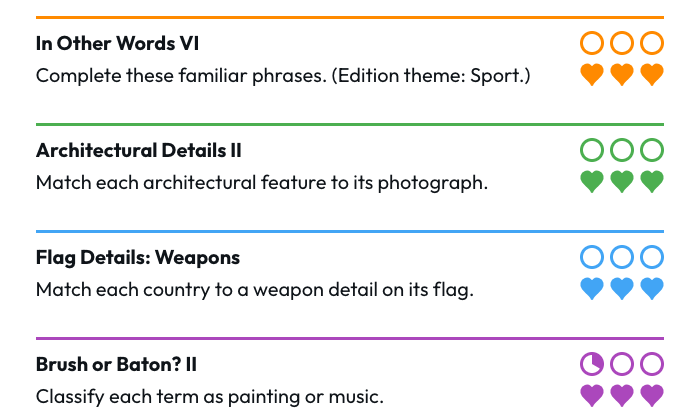
The game screen also offers an “old puzzles in ☰ menu” shortcut. In our November 18 check, the calendar exposed available November dates and a November 5 entry marked in progress. Selecting it opened the four cards for that date. That observation verifies this navigation path in the checked browser, not access on every device or for every account.
Match the displayed date to the set you want
Use the date inside Daily Orbs as your reference. A date on your phone, a search snippet or the independent guide may differ from the date currently displayed by the game. Check it before you start answering or share a result.
Previous day and Next day are relative to the set you are viewing. After opening November 5 in our check, those controls pointed to November 4 and November 6. They are useful for exploring adjacent sets; they do not mean the game has selected today's puzzles. Use the original game's home link when you want to return to its current set.
A future or unavailable calendar cell is not a promise of a playable puzzle. This guide does not provide future answers, publish the publisher's answer bank or bypass access prompts.
Revisit an old day without assuming a fresh attempt
Opening an older date lets you revisit that set. It does not establish that every puzzle resets. The November 5 calendar entry in our check still showed in-progress play, and the corresponding card retained a partly filled orb.
If you return to a date you have already started, inspect its orb meter, hearts and completion state before assuming you can earn everything again. This guide has not verified a reset or replay-from-zero feature for completed puzzles. An archive and a reset button serve different purposes.
The usual scoring distinction still matters: each puzzle offers three orbs, but an accepted answer can advance only part of an orb. Keep earned progress separate from remaining hearts and from the opportunity to answer further questions. The rules guide explains those differences using a dated example.
Rewarded ads and Daily Orbs Premium
The publisher's policy says archive play may present a rewarded-ad prompt. It also says the current daily set is not behind an ad. Seeing no prompt during one visit does not prove all archive visits are ad-free.
Premium is an optional paid subscription on the original site. The publisher says it removes ads while the subscriber is signed in and that Premium members are not offered archive rewarded ads. Follow the account status and choices shown there. Dailyorbs.co does not sell Premium, process payment or unlock dates.
Check the publisher's current checkout terms before choosing a subscription. Archive access policies and available account options belong to the original publisher.
Keep progress while checking an archive problem
Continue in the same browser when you want to preserve its existing guest state. A private window, another device or a direct visit outside an embedded game may show a different state. We do not guarantee that progress is shared between those contexts.
If a date will not open, first note the displayed date, browser and visible message. Try the original game directly to distinguish an embedded-view problem from a problem there. Avoid clearing site data as an early troubleshooting step: it can affect locally stored play. Our loading-help guide provides a step-by-step comparison, and the phone guide covers mobile browser access.
For a puzzle or account problem, use the original game's feedback option. For a broken link on this guide, contact this site.
Sources and scope
Checked November 18, 2026: the original game and Archive calendar, official scoring instructions and the publisher's Privacy & Terms. Calendar navigation and a retained November 5 state were observed in a desktop browser; physical iPhone and Android testing has not been completed.
This is an independent navigation guide. It supplies no puzzle answers and makes no affiliation claim. Return to Daily Orbs.